null
Control Panels & Remote Controllers

Control Panels & Remote Controllers

The control panel or remote is the part of a pool automation system the owner actually touches. The main board at the equipment pad does the work, but the indoor wall panel, the outdoor panel on the power center, the wireless handheld by the spa and the phone app are how people start the spa, change the heater set point, turn on the lights and adjust pump schedules. When an interface fails, the pool usually keeps running on its last schedule, but the owner loses control, and that turns into a service call fast.

This category covers indoor and outdoor control panels, spa-side remotes, wireless handheld remotes and transceivers, and connectivity modules for apps on the major platforms, including Jandy AquaLink, Pentair IntelliCenter and EasyTouch, and Hayward OmniLogic and related systems. Service techs buy these to replace a dead or weather-beaten panel. Homeowners buy them to add a second control point inside the house or a remote at the spa. Builders add them to a new automation install.

How Control Panels and Remotes Work

On most automation systems, every panel is a client on a shared communication bus, usually a four-wire RS-485 connection: two wires for low-voltage power and two for data. The main board is in charge, and each panel sends button presses and reads status back. That is why one bad panel or a shorted cable can sometimes knock out communication for every device on the bus.

  • Outdoor panels. Mounted on or inside the power center. Built for weather, used mostly by service techs for setup and diagnostics.
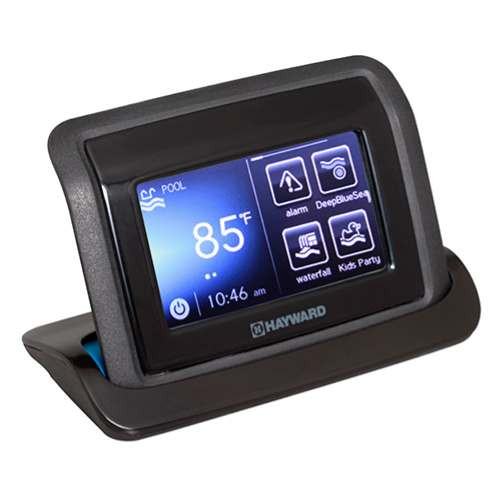
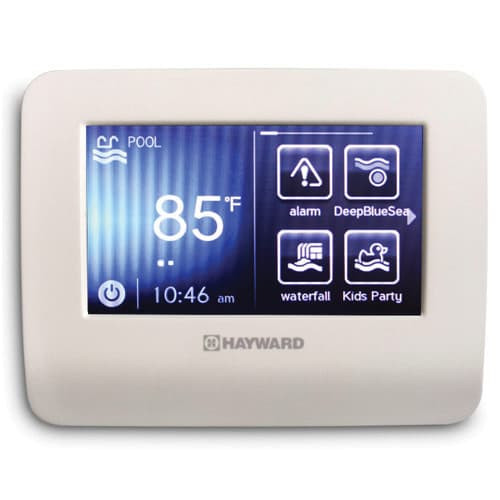
  • Indoor wall panels. Mounted in the house, typically a kitchen or hallway, and wired back to the pad with a communication cable. Many show full menus, schedules and temperatures.
  • Spa-side remotes. Small button pads installed at the spa coping or nearby. Some are pneumatic air buttons with no electricity at the spa; others are low-voltage electronic remotes wired to the controller.
  • Wireless handhelds. Battery-powered remotes that talk by radio to a transceiver or base station wired into the controller. They give full control from the patio without a wire to the spa.
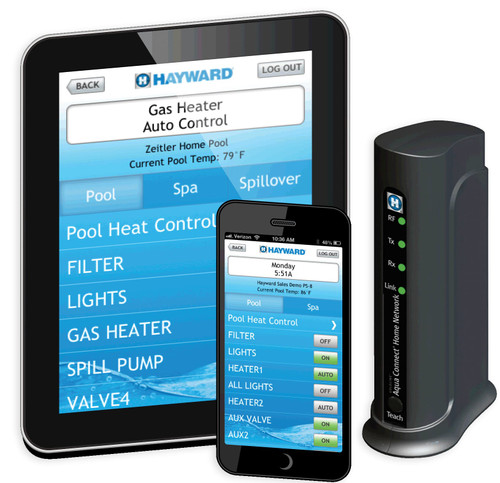
  • Apps and web modules. A network module connects the controller to home Wi-Fi or Ethernet so the owner can use the manufacturer's app. Some newer controllers have connectivity built in.

Signs a Panel or Remote Is Failing

  • Blank or dim display while the controller and other panels work. Check the cable and the panel's power wires before condemning the panel.
  • Buttons that stop responding, need hard presses or trigger the wrong function. Membrane keypads wear out and sun-baked overlays crack.
  • Fogging or water inside the screen, which is common on outdoor and spa-side units after years of sun, rain and sprinkler spray.
  • Communication errors such as "no communication," "checking system" or a panel stuck on a startup screen. These can be the panel, the cable or a bad terminal at the board.
  • Wireless remote with short range or frequent dropouts even with fresh batteries. The transceiver antenna, its location or the remote itself may be the issue.
  • App that no longer connects after a router change, a network module failure or a firmware gap between the module and the controller.

Before ordering a panel, rule out the easy stuff: power cycle the controller, reseat the connector, inspect the cable for rodent damage or water in a junction box, and swap in a known-good panel if you carry one.

How to Choose the Right Panel or Remote

  1. Identify the controller. Get the brand, model and ideally the board revision and firmware version from the main controller at the pad. Panels are platform-specific. A Jandy panel will not run a Pentair board, and even within one brand, panels for different system generations are not always compatible.
  2. Check firmware requirements. Some newer panels require a minimum firmware version on the main board. The product page or the manufacturer's literature will note it. Plan a firmware update or a board revision if needed.
  3. Match pool only versus pool and spa. Many panels come in versions with or without spa functions, and in some cases the panel model must match the controller's configuration.
  4. Indoor versus outdoor rating. An indoor panel mounted outside will fail early. Use outdoor-rated hardware anywhere it sees sun, rain or splash.
  5. Wired versus wireless. Wired panels are the most reliable and need a cable run. Wireless handhelds need a compatible transceiver installed at the controller. Check whether the transceiver is included or sold separately.
  6. Connectivity module. If the goal is phone control, confirm which module works with the existing controller and whether the board needs an update to support it.
Interface Type Best For Key Considerations
Outdoor control panel Service access and setup at the pad Weather rating, matches the power center model
Indoor wall panel Daily owner control from inside the house Communication cable run, firmware compatibility
Spa-side remote (wired) Quick spa, jets and light control at the water Low-voltage cable route, outdoor rated, code clearances
Spa-side air button No electricity at the spa Air switch at the pad, tubing length and condition
Wireless handheld Full control anywhere on the patio Transceiver required, battery type, radio range
App or web module Remote control and alerts from a phone Wi-Fi strength at the pad, controller compatibility

Installation and Safety Tips

  • Turn off power at the controller before connecting or disconnecting any communication cable. Hot-plugging can damage the panel and the board.
  • Use the right cable. Manufacturers specify communication cable gauge, conductor count and maximum length. Long runs with the wrong wire cause intermittent communication faults that are hard to diagnose.
  • Keep low-voltage wiring away from line voltage. Run communication cable in its own conduit, never alongside pump or light circuits.
  • Watch polarity and terminal order. Power and data wires reversed at one terminal can take the whole bus down. Match colors carefully on both ends.
  • Locate wireless transceivers for range. Mount the antenna clear of metal enclosures, block walls and the house siding where possible.
  • Follow NEC clearances near water. Any electrical device installed near the pool or spa must meet Article 680 distance and GFCI rules. Pneumatic air buttons avoid putting electricity at the spa. A licensed electrician should handle anything involving line voltage or new circuits.
  • Secure the app connection. Use a strong, unique password for the owner's pool app account and keep module firmware up to date.

Shopping This Category at HVAC365

Control panels and remotes at HVAC365 are brand-new with the full manufacturer warranty. Product pages list the compatible controller platforms, indoor or outdoor rating and what is included, such as a transceiver or mounting hardware. In-stock items ship in 1-2 business days. If you have the controller model and firmware version but are not sure which panel or remote matches, send it to us and we will help confirm compatibility before you order.

Frequently Asked Questions

Will a new panel work with my older automation controller?

Only if it is made for that platform and generation. Panels are brand-specific, and some newer panels need a minimum firmware revision on the main board. Check the controller's model and firmware before ordering and compare it to the requirements on the product page.

Why did all my panels stop working at the same time?

When every panel goes blank or loses communication at once, look at the shared bus: a shorted communication cable, a failed panel dragging the line down, a loose terminal at the board or a failed controller power supply. Disconnect panels one at a time to isolate the fault.

Do I need a transceiver for a wireless remote?

Yes. Wireless handhelds talk to a transceiver or base station wired to the controller. Some kits include both, while replacement remotes are often sold alone. The product page specifies what comes in the box.

Can I add app control to my existing system?

Many systems can add app control with a connectivity module, sometimes after a firmware update. Very old controllers may not support it at all, in which case upgrading the controller is the only option.

How long should communication cable runs be?

It depends on the platform. Manufacturers publish a maximum length and the cable type they require. Stay within that limit, use continuous runs without splices where possible, and keep the cable away from high-voltage wiring.

Is it safe to install a remote right at the spa?

Yes, when the device is designed for it and installed to code. Pneumatic air buttons carry no electricity, and low-voltage spa-side remotes are built for wet locations. Follow the manufacturer's instructions and NEC Article 680, and use a licensed electrician for any line voltage work.

Compare
Show: 12 24 48

Fast Shipping

Easy Returns

Warranty Coverage

Financing Available