null
Spa Control Panels & Overlays

Spa Control Panels & Overlays

The topside control panel is how a portable spa owner runs the hot tub. It turns the jets on, sets the temperature, starts the blower and lights and programs filter cycles. Behind it is the control pack in the equipment bay, which does the actual switching. Topside panels sit in the sun, get splashed constantly and are pressed by wet fingers for years, so membranes crack, buttons fail and displays fade. The overlay, the printed membrane on top of the panel, is often the first thing to go.

This category covers spa topside control panels, replacement overlays and membranes, and related control parts for portable spas and self-contained hot tubs. Many portable spas use control systems from suppliers such as Balboa, Gecko and Hydro-Quip, and in-ground spas often use pool automation spa-side remotes instead. Hot tub service techs buy topside panels and overlays as some of their most common repair parts. Owners shop here when the panel stops responding or the overlay is peeling.

How Topside Panels and Control Packs Work

  • Control pack. A box in the equipment bay with the main circuit board, relays, heater control, power terminals and sensor connections. It runs the pumps, heater, blower, lights and ozone, and it monitors temperature, flow and safety sensors.
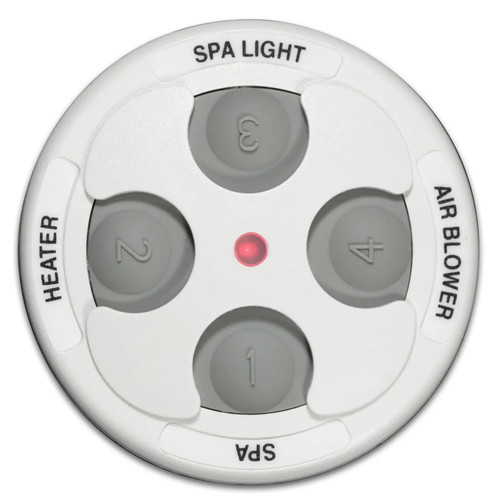
  • Topside panel. A sealed keypad and display mounted in the spa's top rim. It connects to the control pack with a multi-conductor cable and plug. It sends button presses and shows temperature, settings and error codes.
  • Overlay. A printed, adhesive membrane on the face of the panel. It protects the buttons and display window and shows the button labels. On many panels, the overlay can be replaced separately from the panel electronics.
  • Communication. Topside panels speak the control pack's protocol. A panel from one control system manufacturer will not run another's control pack, and even within one brand, panel and pack must be compatible series.

Signs a Topside Panel or Overlay Needs Replacing

  • Cracked, bubbled or peeling overlay, which lets water reach the electronics underneath.
  • Buttons that do not respond or respond only when pressed hard.
  • Display that is blank, dim, fogged or missing segments.
  • Erratic behavior, such as functions turning on by themselves, which can be a shorted button from water intrusion.
  • Communication error codes on the display, or a panel that stays blank while the control pack has power. Check the cable and plug for corrosion before replacing.
  • Faded button labels where the owner can no longer tell which button does what.

Rule out the control pack before replacing a panel. If you have access to a known-good panel of the same type, plug it in. If it works, the original panel is bad. If not, the problem is likely in the control pack, its fuses or the cable.

How to Choose the Right Panel or Overlay

  1. Identify the control pack. The brand and model number are on the control pack label in the equipment bay. This is the most important piece of information for matching a topside.
  2. Read the panel part number. Most topside panels have a part number on the back. With the panel removed from the rim, check the label.
  3. Match the panel shape and size. The rim cutout determines what fits. Replacement panels often come in a specific shape, and a different shape may need an adapter plate or will not fit.
  4. Match the button layout. Panels are configured for the spa's equipment: one or two pumps, blower, light, and other features. A panel with fewer buttons may not control all equipment.
  5. Overlay or full panel. If the panel works but the overlay is cracked or faded, a matching overlay is a lower-cost repair. If the electronics are damaged by water, replace the full panel.
  6. Check the cable and connector. Make sure the plug style and cable length match the control pack and route through the cabinet.
  7. Consider spa manufacturer branding. Many spa brands use custom overlays printed with their own logo and layout over a common panel. The overlay may need to match the spa brand, while the panel electronics match the control system.
Part When to Buy It What to Match
Replacement overlay Panel works but overlay is cracked, peeling or faded Panel model, shape, button layout, spa brand print
Topside control panel Dead buttons, blank display, water damage Control pack brand and series, panel part number, shape
Panel adapter plate New panel shape does not match the rim cutout Rim cutout dimensions, panel model
Topside cable Corroded or damaged cable or plug Connector type, length
Auxiliary or remote panel Adding a second control point Control pack support for a secondary panel

When the Original Panel Is Discontinued

Older portable spas often outlive the topside panel that came with them. When the exact part number is no longer made, control system manufacturers usually publish an approved replacement panel for that control pack series, sometimes with an adapter plate to fill a different rim cutout or an updated overlay for the spa brand. In some cases the control pack itself is also obsolete, and the reliable fix is a new control pack and matching topside sold together as a system. Before ordering, compare the replacement's connector, button functions and supported equipment against what the spa actually has, so every pump, the blower and the light remain controllable after the swap.

Installation and Safety Tips

  • Turn off power at the breaker before unplugging or plugging in a topside panel. Hot-plugging can damage both the panel and the control pack.
  • Use a licensed electrician for any control pack wiring, power supply changes or breaker work. NEC Article 680 requires GFCI protection and a disconnect for spas and hot tubs.
  • Apply overlays to a clean, dry surface. Remove the old overlay completely, clean residue with the method the manufacturer recommends, and align the new overlay carefully before pressing it down. Air bubbles over buttons can cause poor response.
  • Seal the panel. Use the supplied gasket or sealant so water cannot get into the rim cutout or behind the panel.
  • Route the cable away from heaters and moving parts and secure it so it does not get pinched by cabinet panels.
  • Use a spa cover. Keeping the cover on when the spa is not in use protects the topside from UV, which is the main cause of overlay fading and cracking.

Shopping This Category at HVAC365

Topside panels and overlays at HVAC365 are brand-new with the full manufacturer warranty. Product pages list the compatible control packs, panel shape, button layout and connector type where available. In-stock items ship in 1-2 business days. Matching a topside can be tricky, so if you send us the control pack label and the part number from the back of the panel, we will help confirm compatibility.

Frequently Asked Questions

Can I use any topside panel with my control pack?

No. Topside panels must match the control pack's brand and series. Even panels that look similar may use different communication protocols or connectors.

Should I replace just the overlay or the whole panel?

If the panel's buttons and display still work and the overlay is only cracked or faded, replace the overlay. If water has damaged the electronics or the display is failing, replace the panel.

Where do I find my control pack model?

Open the spa's equipment bay and look for the label on the control pack enclosure. It lists the manufacturer, model and often a part number. Photograph it before ordering.

Why does my topside show an error code?

Error codes come from the control pack and indicate faults such as flow problems, sensor failures or overheating. Look up the code in the control system or spa manual. Many codes are not caused by the topside itself.

Can I add a second control panel?

Some control packs support an auxiliary or remote panel. Check the control pack manual or product page for compatibility before ordering.

How do I keep my new overlay from cracking?

Use a spa cover, keep sunscreen and harsh cleaners off the panel and press buttons with fingertips rather than nails or objects. UV exposure is the main cause of overlay failure.

Compare

Fast Shipping

Easy Returns

Warranty Coverage

Financing Available